cat cisco_router_checker.php | sed s'/</\</g'
I could be missing something really obvious here, so if there is a better way of doing it please let me know!
cat cisco_router_checker.php | sed s'/</\</g'
<?php
#
#       Use PHP & SNMP to Interrogate an SNMP enabled Cisco Router
#
#       An HRH Script!!
#
?>
<html>
<head>
<title>PHP Router Checker</title>
</head>
<body bgcolor="Silver">
<center>
<font face="arial" size="2">
<h2>PHP Router Checker</h2>

A Status & Interface checker for an SNMP enabled Router<br><br>


<!-- collect ip & community information !-->
<form action="cisco_router_checker.php" method="POST">

<table>
<tr><td>IP Address   </td><td><center><input type="text" name="ip_in_start"></td></tr>
<tr><td><center>SNMP Comunity </td><td><center><input type="text" name="snmp_in_start"> </td></tr>
<tr><td colspan=2><center><input type="submit" value="submit"> </td></tr>
</table>
</form>
</center>

<!-- PHP TIME!! !-->
<?php


// Set Variables:
$ipin = $_POST["ip_in_start"];
$snmp_com = $_POST["snmp_in_start"];

// Clean output function - Removes the extras given by SNMP
function clean_output($string) {
    $clean_output = preg_replace("/[A-Za-z]*:[ ]/", "", $string);
    $clean_output = preg_replace("/[(][0-9]*[)][ ]/", "", $clean_output);
    $clean_output = str_replace("Gauge32", "", $clean_output);
    $clean_output = str_replace("Counter32", "", $clean_output);
    $clean_output = preg_replace("/[(][0-9][)]/", "", $clean_output);
    return $clean_output;
}

// Check that an IP address has been submitted:
if($ipin == "" || $snmp_com == "") {
    echo "<br>Please submit IP and SNMP community
</font>
</body>
</html>";
    exit;
}

// Create specific OIDs
$sysHSRPact = "1.3.6.1.4.1.9.9.106.1.2.1.1.13.12.1";
$sysHSRPact2 = "1.3.6.1.4.1.9.9.106.1.2.1.1.13.1.1";
$sysHSRP = "1.3.6.1.4.1.9.9.106.1.2.1.1.11.1.1";
$sysHSRP2 = "1.3.6.1.4.1.9.9.106.1.2.1.1.11.12.1";
$sysName = "1.3.6.1.2.1.1.5.0";
$sysDescr = "1.3.6.1.2.1.1.1.0";
$sysUpTime = "1.3.6.1.2.1.1.3.0";
$sysContact = "1.3.6.1.2.1.1.4.0";
$sysReload = "1.3.6.1.4.1.9.2.1.2.0";
$sysFreeMem = "1.3.6.1.4.1.9.2.1.8.0";
$sysChassis = "1.3.6.1.4.1.9.3.6.3.0";
$sysDesc1 = "1.3.6.1.4.1.9.3.6.11.1.3.1";
$sysDesc2 = "1.3.6.1.4.1.9.3.6.11.1.3.2";
$sysDesc3 = "1.3.6.1.4.1.9.3.6.11.1.3.3";
$sysDesc4 = "1.3.6.1.4.1.9.3.6.11.1.3.4";

# Check that we are able to contact the system, If we are then run the rest of the SNMP gets.
$oo1 = clean_output(snmpget($ipin,"$snmp_com",$sysName));

if($oo1 != "") {
    // Now we know that we can contact the device, run the other SNMP gets.
    $oo2 = clean_output(snmpget($ipin,"$snmp_com",$sysDescr));
    $oo3 = clean_output(snmpget($ipin,"$snmp_com",$sysUpTime));
    $oo4 = clean_output(snmpget($ipin,"$snmp_com",$sysContact));
    $oo5 = clean_output(snmpget($ipin,"$snmp_com",$sysReload));
    $oo6 = clean_output(snmpget($ipin,"$snmp_com",$sysFreeMem));
    $oo7 = clean_output(snmpget($ipin,"$snmp_com",$sysChassis));
    $oo8 = clean_output(snmpget($ipin,"$snmp_com",$sysDesc1));
    $oo9 = clean_output(snmpget($ipin,"$snmp_com",$sysDesc2));
    $oo10 = clean_output(snmpget($ipin,"$snmp_com",$sysDesc3));
    $oo12 = clean_output(snmpget($ipin,"$snmp_com",$sysDesc4));
    $oo11 = clean_output(snmpget($ipin,"$snmp_com",$sysHSRP));
    $oo13 = clean_output(snmpget($ipin,"$snmp_com",$sysHSRPact));
    # Run the alternate HSRP oids if they are returned blank.
    if($oo11 == "" ) { $oo11 = clean_output(snmpget($ipin,"$snmp_com",$sysHSRP2)); }
    if($oo13 == "" ) { $oo13 = clean_output(snmpget($ipin,"$snmp_com",$sysHSRPact2)); }
} else { echo "Unable to contact Router, Please check you are able to ping it."; }

// Show the System stats at the start of the table.
echo "<br><b>System IP: </b> $ipin";
echo "<br><b>HSRP Adr: </b> $oo11";
echo "<br><b>HSRP Master: </b> $oo13";
echo "<br><b>System Name:</b> $oo1";
echo "<br><b>System Description:</b><br> $oo2";
echo "<br><b>System Up Time:</b> $oo3 ";
echo "<br><b>System Contact:</b> $oo4 ";
echo "<br><b>Last reboot due to:</b> $oo5 ";
echo "<br><b>Free Memory:</b> $oo6";
echo "<br><b>Chassis ID:</b> $oo7";
echo "<br><b>Card 1 Desc:</b> $oo8";
echo "<br><b>Card 2 Desc:</b> $oo9";
echo "<br><b>Card 3 Desc:</b> $oo10";
echo "<br><b>Card 4 Desc:</b> $oo12";
?>

<!-- Interface Status Table !-->
<br><br><br>
<center><b>Interface Status Table</b><br></center>
<table border="1" bgcolor="white">
<tr>
<td>Interface Description</td>
<td>Interface Speed</td>
<td>Admin status</td>
<td>Operational Status</td>
<td><center>Last Change</center></td>
<td>Int in Unicast</td>
<td>Int in Discards</td>
<td>Int in Errors</td>
<td>Int out Unicast</td>
<td>Int out Discards</td>
<td>Int out Errors</td>
</tr>

<!-- Collect the Interface stats !-->
<?php

// Interface OIDs Array
$oid[] = "1.3.6.1.2.1.2.2.1.2.";   // Interface description
$oid[] = "1.3.6.1.2.1.2.2.1.5.";   // Interface Speed
$oid[] = "1.3.6.1.2.1.2.2.1.7.";   // Admin Status
$oid[] = "1.3.6.1.2.1.2.2.1.8.";   // Operating Status
$oid[] = "1.3.6.1.2.1.2.2.1.9.";   // Last Change
$oid[] = "1.3.6.1.2.1.2.2.1.11.";  // Interface INBOUND Pkts
$oid[] = "1.3.6.1.2.1.2.2.1.13.";  // Interface in Discards
$oid[] = "1.3.6.1.2.1.2.2.1.14.";  // Interface in Errors
$oid[] = "1.3.6.1.2.1.2.2.1.17.";  // Interface OUTBOUND Pkts
$oid[] = "1.3.6.1.2.1.2.2.1.19.";  // Interface out Discards
$oid[] = "1.3.6.1.2.1.2.2.1.20.";  // Interface out Errors


// Build a for loop to check the first 20 interfaces and only show the lines which have relevant information
for($a=1;$a<20;$a++) {
    # Check if the interface is responding:
    $out[0] = clean_output(snmpget($ipin,"$snmp_com",$oid[0]."$a"));
    if($out[0] == "" ) {
    echo "
";
    } else {
        # Now we know that this interface is responding
        if(substr($out[0],0,4) == "rios" || substr($out[0],0,3) == "aux" || substr($out[0],0,2) == "lo") { continue; } // Remove the 'rios' interfaces, these can be replaced by commenting this line.
        echo "<tr>";
        echo "<td>".$out[0]." $a</td>";
        for($b=1;$b<count($oid);$b++) {
            echo "<td>".clean_output(snmpget($ipin,"$snmp_com",$oid[$b]."$a"));
        }
        echo "</tr>";
    }
}


?>
</table>
</font>
</body>
</html>
EXAMPLE OUTPUT - Click to enlarge!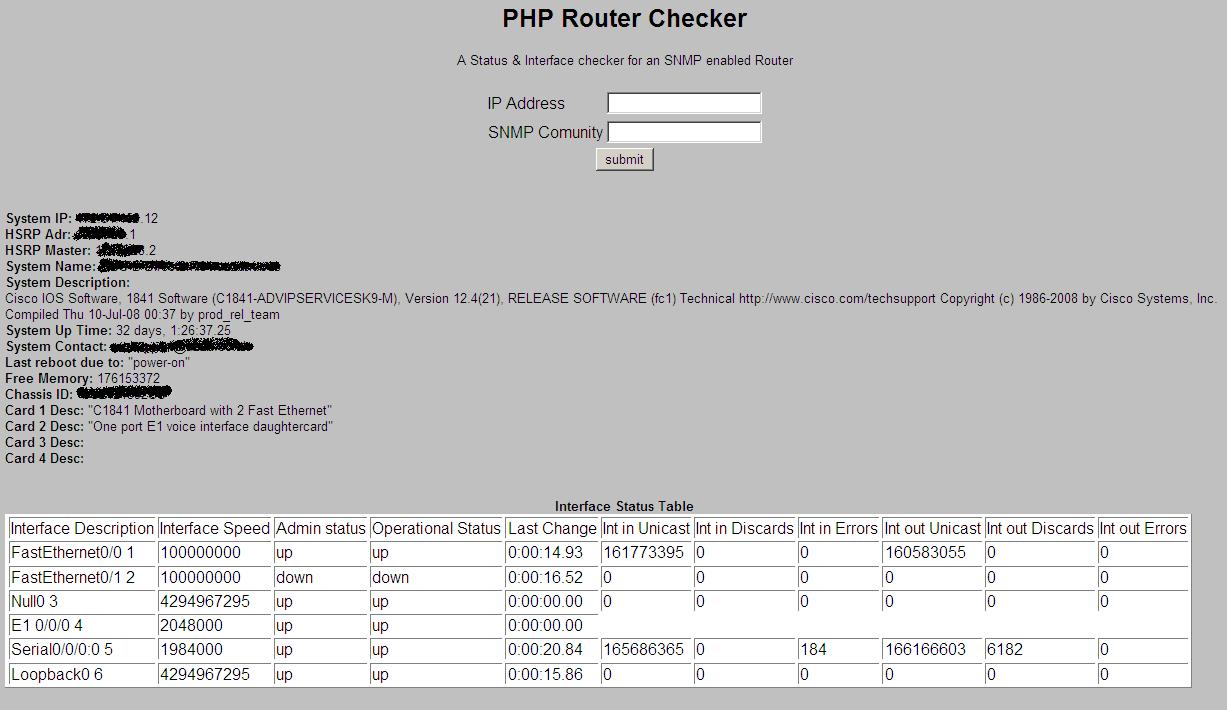
#!/bin/bash
#
# A football results checker script. Checks if Portsmouth or
# Palace have lost in the last week, and if so, sends out a
# 'Commiseration' email
#
#
#  An HRH Script!!!!
results_site="http://news.bbc.co.uk/sport1/hi/football/results/default.stm"
palace_file="/var/www/hrhscript/footiecheck/palace_res.txt"
pompy_file="/var/www/hrhscript/footiecheck/pompy_res.txt"
palace_email="/var/www/hrhscript/footiecheck/palace_email.txt"
pompy_email="/var/www/hrhscript/footiecheck/pompy_email.txt"


# collect the data from the bbc site
#wget --proxy=off $results_site -o results.txt
wget $results_site -o results.txt
# Check for the last time they played, and create a file with that information.
cat default.stm | grep -m 1 "Crystal Palace" > $palace_file
cat default.stm | grep -m 1 "Portsmouth" > $pompy_file

# Run the php script to check these files
./create_report.php 2> /dev/null

# Send out the emails if there is one to send.
if [ -f $palace_email ]
then
./paul_email.php
rm -f $palace_email
fi

if [ -f $pompy_email ]
then
./mark_email.php
rm -f $pompy_email
fi


# Remove the used files to start fresh next monday
rm -f default.stm  # remove the BBC website information
rm -f p*res.txt    # remove the results text files
rm -f results.txt
#!/usr/bin/php
# This is a bit of code to parse the output from the football result files. If there are files to check, it
# will have a look at them, work out whats happened, and send out the good news!!!

# Assign variables
$palace_email = "your.victim@theirdomain.co.uk";
$pompy_email = "your.victim@theirdomain.co.uk";
$palace_str = "Crystal Palace";
$pompy_str = "Portsmouth";
$palace_draw = false;
$pompy_draw = false;

# Collect data which has come from bash and wget
$palace_text = `cat /var/www/hrhscript/footiecheck/palace_res.txt`;
$pompy_text = `cat /var/www/hrhscript/footiecheck/pompy_res.txt`;
$palace_len = strlen($palace_text);
$pompy_len = strlen($pompy_text);

# A function to clean up the html text passed in to a point where we can use it.
# This is not done via a strip tags function as we can use this to our advantage later
function clean_up_html($text_in) {
    $out = str_replace('<div class="mvb"><a href="', "", $text_in);
    $out = str_replace('</div>', "", $out);
    $out = str_replace('" class="stats">', " % ", $out);
    $out = str_replace(' | <a href="', "", $out);
    $out = str_replace('">Report', "", $out);
    $out = str_replace('<a href="', "", $out);
    return $out;
}

# A function to create the email text which will be sent out
function create_email($team,$lost_to,$notify_name,$notify,$report_url,$file_name) {

    # Variables
    $start = "Dear $notify_name , \n\nIn my absence I would like to let you know that $team lost to $lost_to this weekend. \n\nI cannot personally tell you how rubbish their performance was, however, if it would make you any more miserable, I would like you to read the following match report: $report_url  \n\nKind regards,\nLord Butler";

    # Dump it into the file
    `echo "$start" > $file_name`;
}

# Check what we have to work with, and create the email text.
if ( $palace_len > 200 ) {
    ######### If the script is here, there are palace resutls to analyse:
    # Split up the data into lots of little bits
    $palace_clean = clean_up_html($palace_text);
    $palace_parts = explode("</a>", $palace_clean);
    $home_data = explode(" % ", $palace_parts[0]);
    $away_data = explode(" % ", $palace_parts[1]);
    $result_data = explode(" ", $away_data[0]);
    $result = $result_data[1];
    $scores = explode ("-", $result);
    $home_score = $scores[0];
    $away_score = $scores[1];

    #########  Start with the logic, find out if anything is worth sending.
    # Check if it was a draw.
    if ( $home_score == $away_score ) { $palace_draw = true; echo "The game was a draw \n";}
    if ( !$palace_draw ) {
        # Check if Palace where home or away
        if ( $home_data[1] == $palace_str ) { $palace_home = true; $palace_away = false;$opposing = $away_data[1];}
        if ( $away_data[1] == $palace_str ) { $palace_away = true; $palace_home = false; $opposing = $home_data[1];}
        # Check who won, home or away
        if ( $home_score > $away_score ) { $home_victory = true; } else { $home_victory = false; }
 # Check if palace lost
 if (( $palace_away && $home_victory ) || ( $palace_home && !$home_victory )) {
            create_email($palace_str,$opposing,"Paul",$palace_email,$palace_parts[2],"palace_email.txt");
        } else {
            echo " $palace_str won \n";
        }
    }
} else {
    echo "Palace Results Not found";
}

#################################
#  Now check the pompy results  #
#################################

# Check what we have to work with, and create the email text.
if ( $pompy_len > 200 ) {
    ######### If the script is here, there are pompy resutls to analyse:
    # Split up the data into lots of little bits
    $pompy_clean = clean_up_html($pompy_text);
    $pompy_parts = explode("</a>", $pompy_clean);
    $home_data = explode(" % ", $pompy_parts[0]);
    $away_data = explode(" % ", $pompy_parts[1]);
    $result_data = explode(" ", $away_data[0]);
    $result = $result_data[1];
    $scores = explode ("-", $result);
    $home_score = $scores[0];
    $away_score = $scores[1];

    #########  Start with the logic, find out if anything is worth sending.
    # Check if it was a draw.
    if ( $home_score == $away_score ) { $pompy_draw = true; echo "The $pompy_str game was a draw \n";}
    if ( !$pompy_draw ) {
        # Check if pompy where home or away
        if ( $home_data[1] == $pompy_str ) { $pompy_home = true; $pompy_away = false; $opposing = $away_data[1];}
        if ( $away_data[1] == $pompy_str ) { $pompy_away = true; $pompy_home = false; $opposing = $home_data[1];}
        # Check who won, home or away
        if ( $home_score > $away_score ) { $home_victory = true; } else { $home_victory = false; }
 # Check if pompy lost
 if (( $pompy_away && $home_victory ) || ( $pompy_home && !$home_victory )) {
            create_email($pompy_str,$opposing,"Mark",$pompy_email,$pompy_parts[2],"pompy_email.txt");
        } else {
            echo " $pompy_str won \n";
        }
    }
} else {
    echo "pompy Results Not found";
}
#!/usr/bin/php
/*
* The PHP mailer programs - HRH
*/
$to = "notify.victim1@theirdommain.co.uk, notify.victim1@theirdommain.co.uk";
$subject = "This Weekends results";
$msg = `cat /var/www/hrhscript/footiecheck/pompy_email.txt`;
$header = 'From: Lord Butler';
mail($to,$subject,$msg,$header);
"30 8 * * 1 cd /var/www/hrhscript/footiecheck/ ; ./football_check.sh #Football check report"
'''
Created on Oct 11, 2010

@author: His Royal Highness

The squid log reader will analyse the squid access.log file and produce stats on its
content. it expects access.log to be in the same directory,
but this can be changed to an absolute path as requried.
'''

''' VARIABLES '''
filename = "access.log"
file = open(filename)
''' Request Variables '''
total_requests = 0
total_cache_hits = 0
total_cache_misses = 0
''' Byte Total Variables '''
total_requested_bytes = 0
total_cache_bytes = 0
total_miss_bytes = 0
total_other_bytes = 0
host_requests = {}
host_total_bytes = {}
domain_requests = {}
domain_bytes = {}

''' Strip back URL to what we will measure on '''
def striptodomain(url):
    stripped = url.replace("http://", "")
    #stripped = stripped.repace("www.")
    bits = stripped.split('/')
    hostname = bits[0]
    return hostname


''' Rip through the file and generate the stats '''
for line in file:
    bit = line.split()
    total_requests += 1

    ''' Add in the host request and bytes totals '''
    if bit[2] in host_requests:
        host_requests[bit[2]] += 1
        host_total_bytes[bit[2]] = int(host_total_bytes[bit[2]]) + int(bit[1])
    else:
        host_requests[bit[2]] = 1
        host_total_bytes[bit[2]] = int(bit[1])


    ''' Add in the Domain request and bytes totals '''
    hostname = striptodomain(bit[6])
    if hostname in domain_requests:
        domain_requests[hostname] += 1
        domain_bytes[hostname] = int(domain_bytes[hostname]) + int(bit[1])
    else:
        domain_requests[hostname] = 1
        domain_bytes[hostname] = int(bit[1])


    if 'TCP_HIT' in line or 'TCP_MEM_HIT' in line or 'TCP_NEGATIVE_HIT' in line or 'TCP_IMS_HIT' in line or 'TCP_REFRESH_HIT' in line:
        total_cache_hits += 1
        total_cache_bytes += int(bit[1])
        total_requested_bytes += int(bit[1])

    elif "TCP_MISS" in line or 'TCP_REFRESH_MISS' in line or 'TCP_CLIENT_REFRESH_MISS' in line:
        total_cache_misses += 1
        total_miss_bytes += int(bit[1])
        total_requested_bytes += int(bit[1])

    else:
        total_other_bytes += int(bit[1])
        total_requested_bytes += int(bit[1])
file.close()


''' Extra file stats '''
total_other = (total_requests - total_cache_hits) - total_cache_misses


''' Calculate Percent values '''
total_cache_hits_pc = round((1.0 * total_cache_hits / total_requests) * 100,2)
total_cache_misses_pc = round((1.0 * total_cache_misses / total_requests) * 100,2)
total_other_pc = round((1.0 * total_other / total_requests) * 100,2)

total_cache_bytes_pc = round((1.0 * total_cache_bytes / total_requested_bytes) * 100,2)
total_miss_bytes_pc = round((1.0 * total_miss_bytes / total_requested_bytes) * 100,2)
total_other_bytes_pc = round((1.0 * total_other_bytes / total_requested_bytes) * 100,2)


''' File type counts'''
print ""
print "Caching Performance"
print "Total requests: \t\t", total_requests
print "Total Cache hits:\t\t",total_cache_hits, total_cache_hits_pc, "%"
print "Total Cache misses:\t" ,total_cache_misses, total_cache_misses_pc, "%"
print "Total Other:\t\t" ,total_other, total_other_pc, "%"
print ""
print "Total bytes: \t\t", total_requested_bytes
print "Total Cache bytes:\t",total_cache_bytes, total_cache_bytes_pc, "%"
print "Total Miss bytes:\t\t",total_miss_bytes, total_miss_bytes_pc, "%"
print "Total Other bytes:\t",total_other_bytes, total_other_bytes_pc, "%"
print ""
print ""
print ""


''' Print Domain statistics '''
#sorted_domain_requests = sorted(domain_requests)
print "Most Requested Domains (hits)"
temp_list = domain_requests.keys()
temp_list.sort( key = domain_requests.__getitem__, reverse = True)
for a in range(25):
    print domain_requests[temp_list[a]]  , "\t\t" , temp_list[a]
print ""
print ""


print "Highest Data Transfer by Domain (bytes)"
temp_list = domain_bytes.keys()
temp_list.sort( key = domain_bytes.__getitem__, reverse = True)
for a in range(25):
    print domain_bytes[temp_list[a]]  , "\t" , temp_list[a]
print ""
print ""

print "Most requesting hosts (hits)"
temp_list = host_requests.keys()
temp_list.sort( key = host_requests.__getitem__, reverse = True)
if len(temp_list) < 25:
    hosts = len(temp_list)
else:
    hosts = 25
for a in range(hosts):
    print host_requests[temp_list[a]]  , "\t" , temp_list[a]
print ""
print ""

print "Highest Data Transfer by Host (bytes)"
temp_list = host_total_bytes.keys()
temp_list.sort( key = host_total_bytes.__getitem__, reverse = True)
for a in range(hosts):
    print host_total_bytes[temp_list[a]]  , "\t" , temp_list[a]
print ""
print ""
