Showing posts with label PHP. Show all posts

Tuesday, 30 November 2010

Managing ProCurve firmware updates with PHP and SNMP

When you look after a large number of switches, it can become important to manage firmware updates effectively. I have created a quick script to run though a list of IP addresses, and check what is the latest available firmware. This is thanks in part to the open way ProCurve allow you obtain new firmware. Not like some other switch vendors... Anyway, I hope this can help a few people out. It certainly comes in handy for me when it comes to update time.

When appling it to you own situation you just need to edit the SNMP community you are using and put your own switch IPs into the device_list array. You can add as many extras as you need.

<?php
/*
 *      ProCurve Firmware Manager
 *
 *      An HRH Script.
 */

### Setup some varibales
$SNMP_COM = 'yourcommunity';
$SYS_DESC_OID = "1.3.6.1.2.1.1.1.0";
$SYS_UP_OID = "1.3.6.1.2.1.1.3.0";
$SYS_NAME_OID = "1.3.6.1.2.1.1.5.0";
$HP_BASE_URL = 'http://h10144.www1.hp.com/customercare/support/software/switches.htm';

## Create a list of the devices we are monitoring
$device_list[] = "10.0.0.254";
$device_list[] = "10.0.1.254";
$device_list[] = "10.0.2.254";
$device_list[] = "10.0.3.254";

# Which Firmware branches are we interested in
$firmware_branch[] = 'E';
$firmware_branch[] = 'F';
$firmware_branch[] = 'G';
$firmware_branch[] = 'H';
$firmware_branch[] = 'I';
$firmware_branch[] = 'K';
$firmware_branch[] = 'R';


# Declare some common functions

# @ Clean output
# A function to remove the unnecessary from SNMP GET otuput
function clean_output($string) {
    $clean_output = preg_replace("/[A-Za-z]*:[ ]/", "", $string);
    $clean_output = preg_replace("/[(][0-9]*[)][ ]/", "", $clean_output);    
    $clean_output = str_replace("Gauge32", "", $clean_output);
    $clean_output = str_replace("Counter32", "", $clean_output);
    $clean_output = preg_replace("/[(][0-9][)]/", "", $clean_output);
    return $clean_output;
}

# @ clean to firmware
# A function to show the procurves running firmware from its 
function clean_to_firmware($string) {
    $clean_output = $string;
    $clean_output = str_replace("revision", "", $clean_output);
    $clean_output = str_replace(" ", "", $clean_output);
    $parts = explode(",",$clean_output);
    return $parts[1];
}

## Get the latest Available firmwares from HP
# Collect the latest list of firmwares from the HP website
exec("wget $HP_BASE_URL 2> error.txt");

## Build the firmware array, with the links and versions of firmware available
if(!file_exists("switches.htm")) {
    echo "Unable to locate switches.htm. Check connectivity to the internet";
    exit();
} else { 
    foreach($firmware_branch as $branch) {
        $output = `cat switches.htm | grep -m 2 $branch.[0-9][0-9][.][0-9][0-9]*\<`;
        # strip the beginning a href, and other bits, to leave a url and version name.
        $output = preg_replace("/[<]a href=\"/", "", $output);
        $output = preg_replace("/\" class=\"[a-z]*\">/", "_", $output);
        $output = preg_replace("%</a><[/brtd]*>%", "", $output);
        $output = str_replace(" ", "", $output);
        $output = str_replace("</a><br>", "", $output);        
        $output = str_replace("</a><spanclass=\"newmarker\">Updated</span><br>", "", $output);
        $lines = explode("\n", $output);
        $bits_pri = explode("_", $lines[0]);
        $bits_sec = explode("_", $lines[1]);
        $firmwares[$branch]['new_ver'] = $bits_pri[1];
        $firmwares[$branch]['new_url'] = $bits_pri[0];
        $firmwares[$branch]['old_ver'] = $bits_sec[1];
        $firmwares[$branch]['old_url'] = $bits_sec[0];
    }

    # Finally remove the switches.htm file so we get it fresh next time
    unlink("switches.htm");
}
?>

<html>
<head><title>Lightweight Network Manager</title></head>
<body bgcolor="silver">
<font face="arial" size="2">
<!-- This is the main display screen !-->
<center>
<h2> Lightweight Network Manager </h2>
<br><br>
</center>
<table cellpadding=5 cellspacing=5>
<tr><th>Device IP</th>
      <th>Device Name</th>
      <th>Device Uptime</th>
      <th>Running Firmware</th>
      <th>Newest Online Firmware</th>
</tr>
<?php

#       This is where the main page content starts
foreach ( $device_list as $device ) 
{
    $running_firmware = clean_to_firmware(clean_output(snmpget($device,$SNMP_COM,$SYS_DESC_OID))) ;
    $temp = explode(".",$running_firmware);
    $branch = $temp[0];
    $newest_firmware = $firmwares[$branch]['new_ver'];
    $newest_url = $firmwares[$branch]['new_url'];

    # Build the line
    echo "<tr>";
    echo "<td>$device</td>";
    echo "<td>" . clean_output(snmpget($device,$SNMP_COM,$SYS_NAME_OID)) . "</td>";
    echo "<td>" . clean_output(snmpget($device,$SNMP_COM,$SYS_UP_OID)) . "</td>";
    echo "<td>" . $running_firmware . "</td>";
    echo '<td><a href="'.$HP_BASE_URL.$newest_url.'">'.$newest_firmware.'</a></td>';
    echo "</tr>";
}
echo "</table>";
?>
</body>
</html>

Running on Windows
Ok, I'm going to have to admit something here. I took two little shortcuts when writing this on two lines (56, and 64 in the code) PHP executes some shell commands which run some common Bash commands. (wget, cat and grep)
There is however no reason why PHP can't do these things. It just requires a little modification to make the download on line 56 dump to a variable, and a couple of filters to replace line 64 which looks for the first occurance of the firmware version in the source code.

If you are behind a proxy, you may want to check the pecl_http extension at:
http://pecl.php.net/package/pecl_http
Which will allow you to specify proxy values to PHP


Notes
  • PHP should be compiled with SNMP, I think this is a defualt on most installations
  • If you have a slow connection to the internet, or a large number of switches to monitor, this could take up to a minute to run. Possibly longer if switches are down as it expects to be able to contact each device.

Friday, 5 November 2010

Monitoring Avaya ACM Trunk Usage, with Cacti and PHP

After becoming frustrated with the lack of built in monitoring for Avaya ACM trunk usage (ie how many concurrent phone calls were happening) I decided to have a poke around using SNMP to see if it was possible. In the end, I found a way to poll for the current status of each channel on each trunk, and then it was just a case of adding up the active ones to get a number of concurrent calls. It is written in PHP and can either be called from the command line, or as I have done, tied into Cacti to create historic graphs for each trunk.

There are two scripts on offer here, both can be run as standalone scripts while troubleshooting. The first one is a tool which will interrogate your Avaya system. This provides feedback on all the trunks it contains, and which channels are active on each trunk. The information is dumped out to the CLI, but its in a nice PHP array form which is ready for any further modification you may wish to make.

The second script, will take the Avaya host and trunk number as parameters and will return the total number of channels and how many are active. This is the script which gets called by the Cacti poller to allow it to graph channel usage.


The CLI Script: avaya_active_trunks.php
<?php
/*      A SNMP Poller to find out what the Avaya trunks are doing.
 *
 *      An HRH script !!
 *
 */

/* Variables */
$server = "youravayaip"; # Set this to the Management IP of your Avaya box
$community = "yourcommunity";   # Should be set to the SNMP community configured on the Avaya box

/* do NOT run this script through a web browser */
if (!isset($_SERVER["argv"][0]) || isset($_SERVER['REQUEST_METHOD'])  || isset($_SERVER['REMOTE_ADDR'])) {
        die("<br><strong>This script is only meant to run at the command line.</strong>");
}
$no_http_headers = true;

/* display No errors */
error_reporting(0);

/* Do a quick dummy walk to 'wake up' the avaya box */
echo "Waking up SNMP on the Avaya, with a SNMPWALK request\n";
snmpwalk($server,$community,"1.3.6.1.4.1.6889.2.8.1.14.1.1.1.1");

echo "Collecting the trunk channels and membership array\n";
$raw_trunk_array = snmpwalk($server,$community,"1.3.6.1.4.1.6889.2.8.1.14.1.1.1");

echo "Collecting the channel status array\n";
$raw_channel_status = snmpwalk($server,$community,"1.3.6.1.4.1.6889.2.8.1.14.1.1.3");

# Start working with the data
$num_channels = count($raw_trunk_array);
$num_trunks = 0;
$b = 1;  // Incrementer for trunks
$c = 0; // Incrementer for chanels
for($a = 0; $a < $num_channels; $a ++) {
    $trunk_num = str_replace("INTEGER: ","",$raw_trunk_array[$a]);

    # Check if we are working on a different trunk to the previous loop
    if($trunk_num != $trunk_array[($b -1)]['name'] ) {
        $trunk_array[$b]['name'] = $trunk_num;
        $trunk_array[($b - 1 )]['channels'] = $c;
        $b++;
        $c = 0;
    }
    $c ++;
}
$trunk_array[$b -1]['channels'] = $c;
sort( $trunk_array );
array_shift( $trunk_array );

## Now that we have the trunk and channel groups, 
# we can add in the channel status to the trunk_array
for($a = 0; $a < count($trunk_array); $a ++) {
    $channels_in_use = 0;
    for($b = 0; $b < $trunk_array[$a]['channels']; $b ++) {
        $text = str_replace('"',"",str_replace("STRING: ","",$raw_channel_status[$num]));
        switch($text) {
        case "in-service/idle":
            $channel_status = 0;
            break;
        case "in-service/active":
            $channel_status = 1;
            break;
        case "OOS/FE-idle":
            $channel_status = -1;
            break;
        case "out-of-service-NE":
            $channel_status = -1;
            break;
        default:
            $channel_status = -1;
            break;
        }
        $trunk_array[$a]['status'][$b] = $channel_status;
        $channels_in_use += $channel_status;
    }

    $trunk_array[$a]['total'] = $channels_in_use;
    $channels_in_use = 0;
}

print_r($trunk_array);
?>


The Cacti Script: single_trunk_status.php
#!/usr/bin/php
<?php
/*      A script to find out how many channels are active on an Avaya Trunk
 * returned in a format which can be read by a person or Cacti.
 *
 *  An HRH script !!
 *
 */

/* variables */
$community = "yourcommunity";

/* do NOT run this script through a web browser */
if (!isset($_SERVER["argv"][0]) || isset($_SERVER['REQUEST_METHOD'])  || isset($_SERVER['REMOTE_ADDR'])) {
 die("
This script is only meant to run at the command line.");
}
$no_http_headers = true;

/* display No errors */
error_reporting(0);

/* Make sure that this script has been called with a hostname and trunk number */
if(isset($argv[1])) { $host = $argv[1]; } else { die("no host name"); }
if(isset($argv[2])) { $trunk_no = $argv[2]; } else { die("no trunk number"); }

/* create the OID we will walk from */
$oid = '1.3.6.1.4.1.6889.2.8.1.14.1.1.3.' . $trunk_no;

/* Do a quick dummy walk to 'wake up' the avaya box */
snmpwalk($host,$community,"1.3.6.1.4.1.6889.2.8.1.14.1.1.1.1");

/* now we have awoken the beast, do the real work */
$raw_channel_status = snmpwalk($host,$community,$oid);

/* work out how many were in use */
$used = 0;
for($a = 0; $a < count($raw_channel_status); $a ++) {
    $text = str_replace('"',"",str_replace("STRING: ","",$raw_channel_status[$a]));
 switch($text) {
 case "in-service/idle":
     $channel_status = 0;
     break;
 case "in-service/active":
     $channel_status = 1;
     break;
 case "OOS/FE-idle":
     $channel_status = -1;
     break;
 case "out-of-service-NE":
     $channel_status = -1;
     break;
 default:
     $channel_status = -1;
     break;
 }
 $used += $channel_status;
}

/* return the data */
echo "active_channels:$used total_channels:". count($raw_channel_status);

?>

Example output - When run from cli
[user@server scripts] php single_trunk_status.php 10.10.10.10 15   #15 is the trunk number
active_channels:2 total_channels:30

Installing into Cacti
Its been a while since I did this so if you get stuck, please let me know and I will try to assist! You might also want to read here, which is the Cacti guide to adding external scripts:
http://www.cacti.net/downloads/docs/html/making_scripts_work_with_cacti.html


1. Create the data input method - From the console, click on Data Input Methods, then click on Add in the top right hand corner. Give it a name, and put the path to the script in as below then click create. Once that is done, add in the Input and Output Fields as below.


 2. Click on the Data Source tab in the console, give it a name and and select Trunk Check for the Data input method. For the data Soure Item tab you will need to add in both "active_channels" & "total_channels". Finally you should add the Hostname and Trunk Number which the script will need to monitor.
3. With all that in place, you can create a graph for the data :)


Notes
  • You will need to ensure that your Avaya system is configured to accept SNMP requests. You can check your current settings from the web portal of the server under the maintenance tab. From there SNMP settings are listed. You will need to configure an SNMP community and allow access from the server which will poll it. In my experience I also had to restart the agent after each change.
  • Your PHP installation will need to have been installed with SNMP support (I believe this is normally a default)


OIDS - These were surprisingly hard to find, so I hope I can save someone some time!
g3pkprincipalCallsCCAC1.3.6.1.4.1.6889.2.8.1.139.6.1.9
g3trunksta1.3.6.1.4.1.6889.2.8.1.14
g3trunkstaTable1.3.6.1.4.1.6889.2.8.1.14.1
g3trunkstaEntry1.3.6.1.4.1.6889.2.8.1.14.1.1
g3trunkstaTrunkGroup1.3.6.1.4.1.6889.2.8.1.14.1.1.1
g3trunkstaConnPort61.3.6.1.4.1.6889.2.8.1.14.1.1.10
g3trunkstaConnPort71.3.6.1.4.1.6889.2.8.1.14.1.1.11
g3trunkstaConnPort81.3.6.1.4.1.6889.2.8.1.14.1.1.12
g3trunkstaConnPort91.3.6.1.4.1.6889.2.8.1.14.1.1.13
g3trunkstaMember1.3.6.1.4.1.6889.2.8.1.14.1.1.2
g3trunkstaServiceState1.3.6.1.4.1.6889.2.8.1.14.1.1.3
g3trunkstaMaintBusy1.3.6.1.4.1.6889.2.8.1.14.1.1.4
g3trunkstaConnPort11.3.6.1.4.1.6889.2.8.1.14.1.1.5
g3trunkstaConnPort21.3.6.1.4.1.6889.2.8.1.14.1.1.6
g3trunkstaConnPort31.3.6.1.4.1.6889.2.8.1.14.1.1.7
g3trunkstaConnPort41.3.6.1.4.1.6889.2.8.1.14.1.1.8
g3trunkstaConnPort51.3.6.1.4.1.6889.2.8.1.14.1.1.9

Tuesday, 2 November 2010

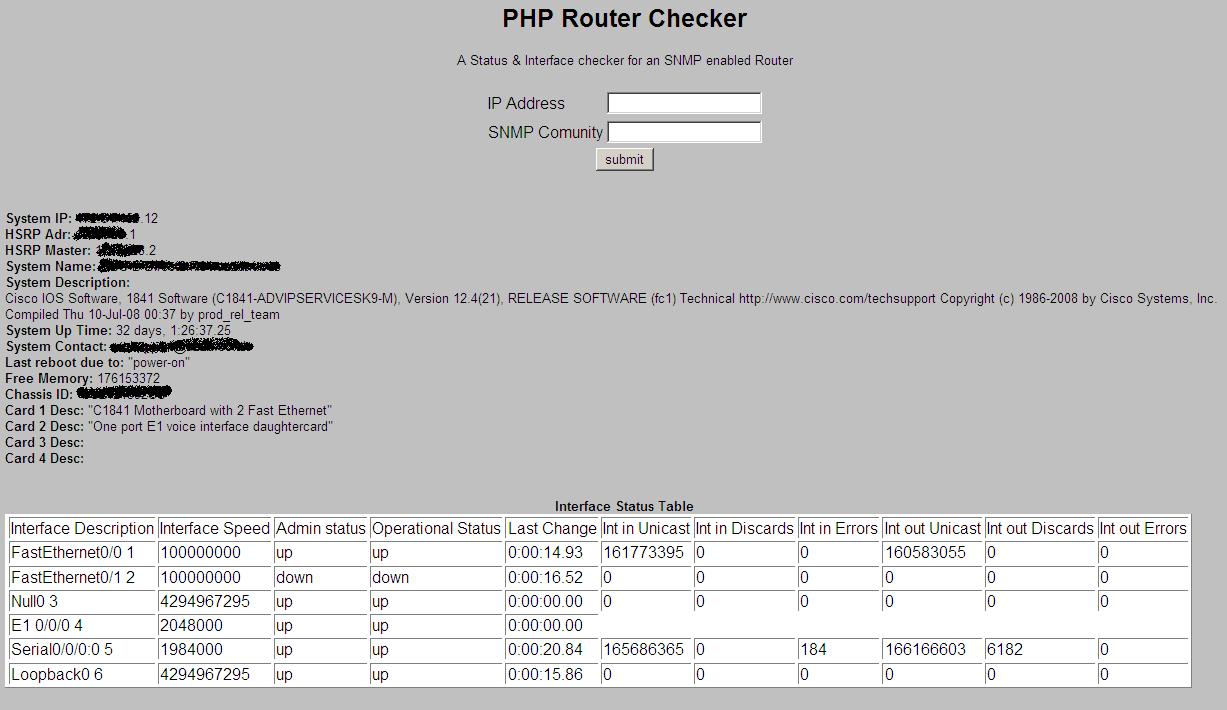
PHP & SNMP Router Checker

The PHP Cisco Router checker is a small script which can be placed on a suitable web server and called to report on an SNMP enabled router. This was developed with Cisco routers in mind, however it works without modification for many other vendors devices.

THE SCRIPT - cisco_router_checker.php
<?php
#  
#       Use PHP & SNMP to Interrogate an SNMP enabled Cisco Router
#
#       An HRH Script!!
#
?>
<html>
<head>
<title>PHP Router Checker</title>
</head>
<body bgcolor="Silver">
<center>
<font face="arial" size="2">
<h2>PHP Router Checker</h2>

A Status & Interface checker for an SNMP enabled Router<br><br>


<!-- collect ip & community information !-->
<form action="cisco_router_checker.php" method="POST">

<table>
<tr><td>IP Address   </td><td><center><input type="text" name="ip_in_start"></td></tr>
<tr><td><center>SNMP Comunity </td><td><center><input type="text" name="snmp_in_start"> </td></tr>
<tr><td colspan=2><center><input type="submit" value="submit"> </td></tr>
</table>
</form>
</center>

<!-- PHP TIME!! !-->
<?php


// Set Variables:
$ipin = $_POST["ip_in_start"];
$snmp_com = $_POST["snmp_in_start"];

// Clean output function - Removes the extras given by SNMP
function clean_output($string) {
    $clean_output = preg_replace("/[A-Za-z]*:[ ]/", "", $string);
    $clean_output = preg_replace("/[(][0-9]*[)][ ]/", "", $clean_output);
    $clean_output = str_replace("Gauge32", "", $clean_output);
    $clean_output = str_replace("Counter32", "", $clean_output);
    $clean_output = preg_replace("/[(][0-9][)]/", "", $clean_output);
    return $clean_output;
}

// Check that an IP address has been submitted:
if($ipin == "" || $snmp_com == "") {
    echo "<br>Please submit IP and SNMP community
</font>
</body>
</html>";
    exit;
}

// Create specific OIDs
$sysHSRPact = "1.3.6.1.4.1.9.9.106.1.2.1.1.13.12.1";
$sysHSRPact2 = "1.3.6.1.4.1.9.9.106.1.2.1.1.13.1.1";
$sysHSRP = "1.3.6.1.4.1.9.9.106.1.2.1.1.11.1.1";
$sysHSRP2 = "1.3.6.1.4.1.9.9.106.1.2.1.1.11.12.1";
$sysName = "1.3.6.1.2.1.1.5.0";
$sysDescr = "1.3.6.1.2.1.1.1.0";
$sysUpTime = "1.3.6.1.2.1.1.3.0";
$sysContact = "1.3.6.1.2.1.1.4.0";
$sysReload = "1.3.6.1.4.1.9.2.1.2.0";
$sysFreeMem = "1.3.6.1.4.1.9.2.1.8.0";
$sysChassis = "1.3.6.1.4.1.9.3.6.3.0";
$sysDesc1 = "1.3.6.1.4.1.9.3.6.11.1.3.1";
$sysDesc2 = "1.3.6.1.4.1.9.3.6.11.1.3.2";
$sysDesc3 = "1.3.6.1.4.1.9.3.6.11.1.3.3";
$sysDesc4 = "1.3.6.1.4.1.9.3.6.11.1.3.4";

# Check that we are able to contact the system, If we are then run the rest of the SNMP gets.
$oo1 = clean_output(snmpget($ipin,"$snmp_com",$sysName));

if($oo1 != "") { 
    // Now we know that we can contact the device, run the other SNMP gets.
    $oo2 = clean_output(snmpget($ipin,"$snmp_com",$sysDescr));
    $oo3 = clean_output(snmpget($ipin,"$snmp_com",$sysUpTime));
    $oo4 = clean_output(snmpget($ipin,"$snmp_com",$sysContact));
    $oo5 = clean_output(snmpget($ipin,"$snmp_com",$sysReload));
    $oo6 = clean_output(snmpget($ipin,"$snmp_com",$sysFreeMem));
    $oo7 = clean_output(snmpget($ipin,"$snmp_com",$sysChassis));
    $oo8 = clean_output(snmpget($ipin,"$snmp_com",$sysDesc1));
    $oo9 = clean_output(snmpget($ipin,"$snmp_com",$sysDesc2));
    $oo10 = clean_output(snmpget($ipin,"$snmp_com",$sysDesc3));
    $oo12 = clean_output(snmpget($ipin,"$snmp_com",$sysDesc4));
    $oo11 = clean_output(snmpget($ipin,"$snmp_com",$sysHSRP));
    $oo13 = clean_output(snmpget($ipin,"$snmp_com",$sysHSRPact));
    # Run the alternate HSRP oids if they are returned blank.
    if($oo11 == "" ) { $oo11 = clean_output(snmpget($ipin,"$snmp_com",$sysHSRP2)); }
    if($oo13 == "" ) { $oo13 = clean_output(snmpget($ipin,"$snmp_com",$sysHSRPact2)); }
} else { echo "Unable to contact Router, Please check you are able to ping it."; }

// Show the System stats at the start of the table.
echo "<br><b>System IP: </b> $ipin";
echo "<br><b>HSRP Adr: </b> $oo11";
echo "<br><b>HSRP Master: </b> $oo13";
echo "<br><b>System Name:</b> $oo1"; 
echo "<br><b>System Description:</b><br> $oo2";
echo "<br><b>System Up Time:</b> $oo3 ";
echo "<br><b>System Contact:</b> $oo4 ";
echo "<br><b>Last reboot due to:</b> $oo5 ";
echo "<br><b>Free Memory:</b> $oo6";
echo "<br><b>Chassis ID:</b> $oo7";
echo "<br><b>Card 1 Desc:</b> $oo8";
echo "<br><b>Card 2 Desc:</b> $oo9";
echo "<br><b>Card 3 Desc:</b> $oo10";
echo "<br><b>Card 4 Desc:</b> $oo12";
?>

<!-- Interface Status Table !-->
<br><br><br>
<center><b>Interface Status Table</b><br></center>
<table border="1" bgcolor="white">
<tr>
<td>Interface Description</td>
<td>Interface Speed</td>
<td>Admin status</td>
<td>Operational Status</td>
<td><center>Last Change</center></td>
<td>Int in Unicast</td>
<td>Int in Discards</td>
<td>Int in Errors</td>
<td>Int out Unicast</td>
<td>Int out Discards</td>
<td>Int out Errors</td>
</tr>

<!-- Collect the Interface stats !-->
<?php

// Interface OIDs Array
$oid[] = "1.3.6.1.2.1.2.2.1.2.";   // Interface description
$oid[] = "1.3.6.1.2.1.2.2.1.5.";   // Interface Speed
$oid[] = "1.3.6.1.2.1.2.2.1.7.";   // Admin Status
$oid[] = "1.3.6.1.2.1.2.2.1.8.";   // Operating Status
$oid[] = "1.3.6.1.2.1.2.2.1.9.";   // Last Change
$oid[] = "1.3.6.1.2.1.2.2.1.11.";  // Interface INBOUND Pkts
$oid[] = "1.3.6.1.2.1.2.2.1.13.";  // Interface in Discards
$oid[] = "1.3.6.1.2.1.2.2.1.14.";  // Interface in Errors
$oid[] = "1.3.6.1.2.1.2.2.1.17.";  // Interface OUTBOUND Pkts
$oid[] = "1.3.6.1.2.1.2.2.1.19.";  // Interface out Discards
$oid[] = "1.3.6.1.2.1.2.2.1.20.";  // Interface out Errors


// Build a for loop to check the first 20 interfaces and only show the lines which have relevant information
for($a=1;$a<20;$a++) {
    # Check if the interface is responding:
    $out[0] = clean_output(snmpget($ipin,"$snmp_com",$oid[0]."$a"));
    if($out[0] == "" ) {
    echo "
";
    } else {
        # Now we know that this interface is responding
        if(substr($out[0],0,4) == "rios" || substr($out[0],0,3) == "aux" || substr($out[0],0,2) == "lo") { continue; } // Remove the 'rios' interfaces, these can be replaced by commenting this line.
        echo "<tr>";
        echo "<td>".$out[0]." $a</td>";
        for($b=1;$b<count($oid);$b++) {
            echo "<td>".clean_output(snmpget($ipin,"$snmp_com",$oid[$b]."$a"));
        }
        echo "</tr>";
    }
}


?>
</table>
</font>
</body>
</html>

EXAMPLE OUTPUT - Click to enlarge!


NOTES
  • PHP should be compiled with SNMP on the server you wish to run this. (Thats likely to already be the case, but you should check this should you run into problems)
  • If you install this somewhere other than the document root of your webserver, you will need to update its location in the first <form> tag so the action contains the path to the script. If you rename it from cisco_router_checker.php you will also need to change this value to whatever you rename it.
  • For internal use, you may want to hard code the community into the code, instead of having to type it every time

Monday, 1 November 2010

BASH & PHP Football Score Checker and Emailer

In short, this is a system to check the BBC website for the football results, and send out automated email to people who have seen their team lose, complete with a link to the match report. This one is a bit of a mishmash of Bash & PHP, as it was written with speed in mind as opposed to elegance and readability. That said, it should be easy to modify to suit your purposes -  (A find and replace on the teams you are interested in should do). I also need to give some thanks to the BBC here, as the consistent way their site is setup has meant this has been running flawlessly for me for close to a year. Originally written in a hurry before a trip to India, this meant that despite my absense, I was still able to taunt colleagues at work when their football teams lost.

HOW IT WORKS

  • The Bash script football_check.sh, is the parent, which is configured in cron to run each Monday morning. Its job is to collect the source code from the BBC football results site, and grep for the first line matching the team we are looking for. It then dumps this into another file in the same directory which we will use later. Once it has completed this, it calls create_report.php
  • create_report.php opens the files created above and checks if the team has lost. If they have won, or drawn, it will not send out the email. If an email needs to be sent, it contains a template to the content of the email, and creates the text contained in the mail, including a link to the match report.

THE SCRIPTS

  • football_check.sh
  • #!/bin/bash
    #
    # A football results checker script. Checks if Portsmouth or
    # Palace have lost in the last week, and if so, sends out a
    # 'Commiseration' email
    #
    #
    #  An HRH Script!!!!
    results_site="http://news.bbc.co.uk/sport1/hi/football/results/default.stm"
    palace_file="/var/www/hrhscript/footiecheck/palace_res.txt"
    pompy_file="/var/www/hrhscript/footiecheck/pompy_res.txt"
    palace_email="/var/www/hrhscript/footiecheck/palace_email.txt"
    pompy_email="/var/www/hrhscript/footiecheck/pompy_email.txt"
    
    
    # collect the data from the bbc site
    #wget --proxy=off $results_site -o results.txt
    wget $results_site -o results.txt
    # Check for the last time they played, and create a file with that information.
    cat default.stm | grep -m 1 "Crystal Palace" > $palace_file
    cat default.stm | grep -m 1 "Portsmouth" > $pompy_file
    
    # Run the php script to check these files
    ./create_report.php 2> /dev/null
    
    # Send out the emails if there is one to send.
    if [ -f $palace_email ] 
    then
    ./paul_email.php
    rm -f $palace_email
    fi
    
    if [ -f $pompy_email ] 
    then
    ./mark_email.php
    rm -f $pompy_email
    fi
    
    
    # Remove the used files to start fresh next monday
    rm -f default.stm  # remove the BBC website information
    rm -f p*res.txt    # remove the results text files
    rm -f results.txt


  • create_report.php


  • #!/usr/bin/php
    # This is a bit of code to parse the output from the football result files. If there are files to check, it
    # will have a look at them, work out whats happened, and send out the good news!!!
    
    # Assign variables
    $palace_email = "your.victim@theirdomain.co.uk";
    $pompy_email = "your.victim@theirdomain.co.uk";
    $palace_str = "Crystal Palace";
    $pompy_str = "Portsmouth";
    $palace_draw = false;
    $pompy_draw = false;
    
    # Collect data which has come from bash and wget
    $palace_text = `cat /var/www/hrhscript/footiecheck/palace_res.txt`;
    $pompy_text = `cat /var/www/hrhscript/footiecheck/pompy_res.txt`;
    $palace_len = strlen($palace_text);
    $pompy_len = strlen($pompy_text);
    
    # A function to clean up the html text passed in to a point where we can use it.
    # This is not done via a strip tags function as we can use this to our advantage later 
    function clean_up_html($text_in) {
        $out = str_replace('<div class="mvb"><a href="', "", $text_in);
        $out = str_replace('</div>', "", $out);
        $out = str_replace('" class="stats">', " % ", $out);
        $out = str_replace(' | <a href="', "", $out);
        $out = str_replace('">Report', "", $out);
        $out = str_replace('<a href="', "", $out);
        return $out;
    }
    
    # A function to create the email text which will be sent out
    function create_email($team,$lost_to,$notify_name,$notify,$report_url,$file_name) {
    
        # Variables
        $start = "Dear $notify_name , \n\nIn my absence I would like to let you know that $team lost to $lost_to this weekend. \n\nI cannot personally tell you how rubbish their performance was, however, if it would make you any more miserable, I would like you to read the following match report: $report_url  \n\nKind regards,\nLord Butler";
    
        # Dump it into the file
        `echo "$start" > $file_name`;
    }
    
    # Check what we have to work with, and create the email text.
    if ( $palace_len > 200 ) {
        ######### If the script is here, there are palace resutls to analyse:
        # Split up the data into lots of little bits
        $palace_clean = clean_up_html($palace_text);
        $palace_parts = explode("</a>", $palace_clean);
        $home_data = explode(" % ", $palace_parts[0]);
        $away_data = explode(" % ", $palace_parts[1]);
        $result_data = explode(" ", $away_data[0]);
        $result = $result_data[1];
        $scores = explode ("-", $result);
        $home_score = $scores[0];
        $away_score = $scores[1];
    
        #########  Start with the logic, find out if anything is worth sending.
        # Check if it was a draw.
        if ( $home_score == $away_score ) { $palace_draw = true; echo "The game was a draw \n";}
        if ( !$palace_draw ) { 
            # Check if Palace where home or away
            if ( $home_data[1] == $palace_str ) { $palace_home = true; $palace_away = false;$opposing = $away_data[1];} 
            if ( $away_data[1] == $palace_str ) { $palace_away = true; $palace_home = false; $opposing = $home_data[1];}
            # Check who won, home or away
            if ( $home_score > $away_score ) { $home_victory = true; } else { $home_victory = false; }
     # Check if palace lost
     if (( $palace_away && $home_victory ) || ( $palace_home && !$home_victory )) { 
                create_email($palace_str,$opposing,"Paul",$palace_email,$palace_parts[2],"palace_email.txt");
            } else { 
                echo " $palace_str won \n"; 
            }     
        }
    } else {
        echo "Palace Results Not found";
    }
    
    #################################
    #  Now check the pompy results  #
    #################################
    
    # Check what we have to work with, and create the email text.
    if ( $pompy_len > 200 ) {
        ######### If the script is here, there are pompy resutls to analyse:
        # Split up the data into lots of little bits
        $pompy_clean = clean_up_html($pompy_text);
        $pompy_parts = explode("</a>", $pompy_clean);
        $home_data = explode(" % ", $pompy_parts[0]);
        $away_data = explode(" % ", $pompy_parts[1]);
        $result_data = explode(" ", $away_data[0]);
        $result = $result_data[1];
        $scores = explode ("-", $result);
        $home_score = $scores[0];
        $away_score = $scores[1];
    
        #########  Start with the logic, find out if anything is worth sending.
        # Check if it was a draw.
        if ( $home_score == $away_score ) { $pompy_draw = true; echo "The $pompy_str game was a draw \n";}
        if ( !$pompy_draw ) { 
            # Check if pompy where home or away
            if ( $home_data[1] == $pompy_str ) { $pompy_home = true; $pompy_away = false; $opposing = $away_data[1];} 
            if ( $away_data[1] == $pompy_str ) { $pompy_away = true; $pompy_home = false; $opposing = $home_data[1];}
            # Check who won, home or away
            if ( $home_score > $away_score ) { $home_victory = true; } else { $home_victory = false; }
     # Check if pompy lost
     if (( $pompy_away && $home_victory ) || ( $pompy_home && !$home_victory )) { 
                create_email($pompy_str,$opposing,"Mark",$pompy_email,$pompy_parts[2],"pompy_email.txt");
            } else { 
                echo " $pompy_str won \n"; 
            }
        }
    } else {
        echo "pompy Results Not found";
    }


  • victim_name_email.php


  • #!/usr/bin/php
    /*
    * The PHP mailer programs - HRH
    */
    $to = "notify.victim1@theirdommain.co.uk, notify.victim1@theirdommain.co.uk";
    $subject = "This Weekends results";
    $msg = `cat /var/www/hrhscript/footiecheck/pompy_email.txt`;
    $header = 'From: Lord Butler';
    mail($to,$subject,$msg,$header);
    

    NOTES

    • This script assumes you are able to send / relay mail from the host.
    • Yes I know it could have all been handled by a single php script. It was written in a big hurry!
    • I have added the following line to my crontab, so that this runs at half eight on Monday morning:
    "30 8 * * 1 cd /var/www/hrhscript/footiecheck/ ; ./football_check.sh #Football check report"